

How ServiceJi Transforms A Reactive Outsourced Model Into A Proactive, Data-Driven IT Support Desk https://serviceji.co/it-service-desk-outsourcing/.
There is a myth that outsourcing IT support is a magic bullet. The problem is that if the problems that exist now within the IT support desk are not addressed, then you’re just outsourcing the chaos.
A mid-size enterprise IT leader in an unstructured IT support desk typically wakes up to alerts of mounting tickets and unanswered user emails. The IT support desk can be a black box; metrics are unclear, and managers spend hours chasing updates. Finger-pointing and firefighting are systemic.
In this article we explore the pain of a chaotic IT support desk: delayed resolutions, poor visibility, and an uncontrolled backlog, and we demonstrate how ServiceJi’s approach turns chaos into clarity.
We define each of the critical KPIs (pending incidents/backlog, ticket aging, reassignments/ticket hopping, reopen rate, SLA breaches, MTTR, First-Contact Resolution, throughput, etc.). We explain why each support metric matters and how bad values surface day-to-day.
We then illustrate outsourcing failures (late fixes, lost accountability, endless reporting) and how outsourcing IT support to ServiceJi addresses each. Throughout, we use industry benchmarks and real-world examples to quantify the issues. A “Before/After ServiceJi” table highlights dramatic improvements across KPIs and daily tasks. Ultimately, we suggest visualization aids, a ticket lifecycle flowchart, aging histogram, and reopen/MTTR trends chart, to support this analytic story.
The Manager’s Day (DILO) and Outsourcing Frustrations
Priya, a Service Delivery Manager at a 500-employee firm which approached ServiceJi to outsource its IT support, used to start her day by logging into a spreadsheet of open tickets. By 9 AM, alarms flash: dozens of pending incidents above SLA, some tickets unchanged for days. Priya spent the next hour pinging vendors and checking on stuck tickets. By 10 AM she joins a support stand-up via video call, but the offshore desk only updates status-by-email (“work in progress”) without clear ownership. Unresolved high-priority issues linger. She shuffles her calendar to prepare reports for her CIO, manually compiling data from multiple systems. Midday, an executive calls: why are major incidents still open? Finger-pointing ensues between the outsourced provider (“it’s with your sysadmin”) and internal IT (“it went to the wrong team”). By 3 PM Priya is racing to salvage SLAs, escalating tickets, and fielding frustrated end-users.
This “day in the life” illustrates common pain points in IT support. Visibility is limited and control weak. Reporting is manual anddelayed https://www.researchgate.net/publication/401637018_Utilization_of_Business_Intelligence_Dashboards_for_Continual_
Improvement_of_It_Services_and_Efficient_Workforce_Demand_Prediction_Based_on_Service_Desk_Ticket_Data. Escalations are chaotic, leading to “finger-pointing and blame”. These problems heighten ticket volume and user frustration, eroding IT credibility.
Pain Points: Long, uncontrolled backlogs of pending tickets; outdated tickets (“stale” incidents); tickets bounced among teams (“ticket hopping”); high reopen rates; frequent SLA breaches; and slow mean times to resolve. Each manifests as service chaos (e.g. tickets piling up, repeated work, angry stakeholders). Industry reports from ‘Moveworks’ note that outsourced desks often suffer “loss of contextual insight, rigid SLAs, and limited scalability”. In Priya’s case, these gaps mean she spends her day “chasing updates” rather than improving service.
Key IT support desk KPIs – Definitions, Benchmarks, and Impact
We cover the following KPIs, with definitions, why each matters, and how bad values hurt operations.
- Pending Incidents / Backlog: The total count of unresolved tickets (requests/incidents) at any time. A healthy desk resolves as many tickets as it receives; the ticket balance (opened minus solved) should stay near zero, according to a report by ZenDesk. High backlog means demand exceeds capacity. If new tickets outpace resolutions weekly, the queue grows and MTTR balloons. Causes include understaffing, inefficient processes, or knowledge gaps. Remedy: increase throughput, improve first-contact resolution (FCR), or add resources through efficient IT support outsourcing. Industry guidance: compare weekly tickets opened vs. solved; divergent trend lines signal backlog issues.
- Ticket Aging (Age Distribution): Measures how long tickets stay open. We often visualize this with an aging histogram of open tickets (hours/days vs. ticket count). Tickets aging beyond normal resolution time flag bottlenecks or forgotten issues. For example, “tickets with no activity for 7+ days” indicates stalled incidents. Long tails in the age distribution mean either complex problems or process breakdowns. Causes include unclear ownership (tickets “waiting for user” too long), missed escalations, or insufficient staffing. Too many old tickets create distrust (users see no progress) and risk SLA breaches. Industry practice: dashboards should highlight stale tickets (e.g. >7-day age) for prompt action.
- Reassignment / Transfer Rate: The percentage of tickets passed between teams or agents. Also called “ticket hopping”, it indicates routing or knowledge issues. If 30% of tickets jump from one support group to another, that’s a red flag. High transfer rates often mean tickets went to the wrong first-touch agent. For example, if 20% of helpdesk tickets are reassigned at least once, it wastes time and confuses owners. Root causes: poor initial triage, vague problem categorization, or siloed expertise. Reducing transfers requires clear triage processes and agent training. Zendesk notes that a high transfer rate (routing inefficiency) “identifies gaps in routing rules or categorization issues”.
- Reopen Rate: Percentage of tickets reopened after being closed. Ideally kept low (many experts target <5%). High reopen rates (e.g. >10%) mean fixes aren’t lasting – tickets get closed “prematurely rather than genuinely resolved”. This erodes trust; end-users must contact support repeatedly. Causes include rushed resolutions, incomplete fixes, or misdiagnosis. A low reopen rate indicates effective problem-solving. For example, one industry guideline says a well-run desk aims for <5% reopen rate; above 10% suggests systemic issues. Improving first-contact resolution (FCR) and knowledge management typically lowers reopen rates.
- First-Contact Resolution (FCR): Portion of tickets resolved on the initial customer interaction (or by Level 1 without escalation). High FCR (benchmarks often ~70–80%) means fewer follow-ups and escalations. For instance, many top IT organizations aim for ~80% FCR. Low FCR (e.g. <60%) forces multiple touches and delays, increasing MTTR and backlog. This often indicates under-skilled agents or lack of tools. To improve FCR, empower agents with knowledge bases, remote tools, and training. ServiceJi notes that well-defined first-tier support is crucial in IT support outsourcing.
- Mean Time to Resolve (MTTR): The average elapsed time from ticket creation to closure. Short MTTR means quick resolutions; long MTTR signals delays. For example, Atlassian keeps MTTR to ~2.5 hours for high-priority incidents. Causes of high MTTR include waiting on others, inefficient processes, or lack of diagnostics. MTTR directly affects user satisfaction. Remedy: streamline workflows, use automated ticket classification, and ensure right expert handles the ticket. Industry research shows that companies using automation see 25–30% lower MTTR (due to faster routing and fewer handoffs).
- SLA Compliance / Breaches: Percent of tickets resolved within agreed time targets. Breaches mean unhappy customers and sometimes penalties. For instance, managing global operations, Accenture achieves ~95% SLA compliance by auto-escalating tickets nearing breach. Any missed SLA should be rare (<5% breaches). Frequent breaches (e.g. >10–20%) indicate resource shortages or poor prioritization. Tracking SLA compliance in real time (dashboard alerts when tickets approach breach) is vital. ServiceJi stresses SLA frameworks and reporting (“driving continuous improvement rather than simply presenting metrics”).
- Throughput (Solve Rate): Tickets resolved per unit time (day/week). Throughput measures capacity. If an average desk closes 100 tickets/week but demand is 150/week, backlog grows rapidly. Increasing throughput requires more efficient agents or tools. For example, after an outsourced IT support overhaul, throughput might jump as agents specialize and 24×7 coverage avoids idle hours. Typical back-of-envelope: throughput ≈ (total resolved tickets) ÷ time. If a dashboard shows open vs. solved counts, divergences suggest poor throughput.
Each KPI ties into daily operations. For example, pending incidents/backlog often forces daily firefighting: Priya sees rising backlog and immediately scrambles to find extra staff or reprioritize. Ticket aging shows up as tickets “forgotten” in queues (e.g. “waiting for vendor input” for 3 days). High reassignment rates cause repetitive status updates (“I thought you had that ticket, why did it come back?”). Frequent reopens result in irate users when problems reoccur. SLA breaches trigger executive escalations (“Why is a P1 ticket still open?”). MTTR bloat means recurring issues drag on, disrupting schedules. We see industry noting that automated dashboards prevent “manually time-consuming reporting” and help catch SLA risks early.
Outsourcing IT Support Pitfalls & Fixes
Before ServiceJi (outsourced desk) vs After ServiceJi (shared, metrics-driven model) comparisons are summarized below:
| KPI/Task | Before ServiceJi | After ServiceJi |
| Pending tickets / backlog | Long, growing queue; most tickets unresolved at day’s end. | Slimmed backlog; 24×7 support prevents pile-up; pending count low. |
| Ticket aging (stale tickets) | Many tickets idle >7 days; delays and vendor handoffs. | Alerts flag aging tickets; active escalations keep tickets fresh. |
| Reassignments / hopping | High transfer rate; tickets bounce (wrong queue, finger-pointing). | Clear triage and team ownership; transfers minimized; defined routing rules. |
| Reopen rate | High (≫10%); users reopen tickets frequently; fix not lasting. | Low (≈5% or less); first-contact solutions; thorough diagnostics avoid repeat calls. |
| SLA breaches | Frequent (>10% breaches); manual chasing of overdue tickets. | <5% breaches; automated SLA tracking and escalations ensure on-time resolution. |
| MTTR (resolution time) | Long delays (e.g. days); cause slip on targets; little root-cause analysis. | MTTR shortened 25–30% via automation and expert assignment. |
| First Contact Resolution (FCR) | Low (≈50–60%); agents often escalate or reopen tickets. | High (≥70%); agents empowered with knowledge/AI tools; majority resolved at first pass. |
| Reporting & visibility | Manual, periodic reports; outdated Excel sheets; lack of real-time insights (visibility gap). | Automated dashboards and alerts; real-time KPI reports; transparent data. |
| Service Delivery Manager tasks | Daily firefighting: endless status calls, urgent escalations, manual status updates. | Focused on improvements: monitoring dashboards, optimizing workflows, strategic planning. |
Each row is rooted in both daily pain (left) and ServiceJi’s IT support outsourcing remedy (right). For instance, before outsourcing support to ServiceJi, unmet SLAs and pending tickets forced continuous escalations; afterward, real-time SLA alerts and full-time coverage drive compliance up.
How ServiceJi’s Features Map to KPIs
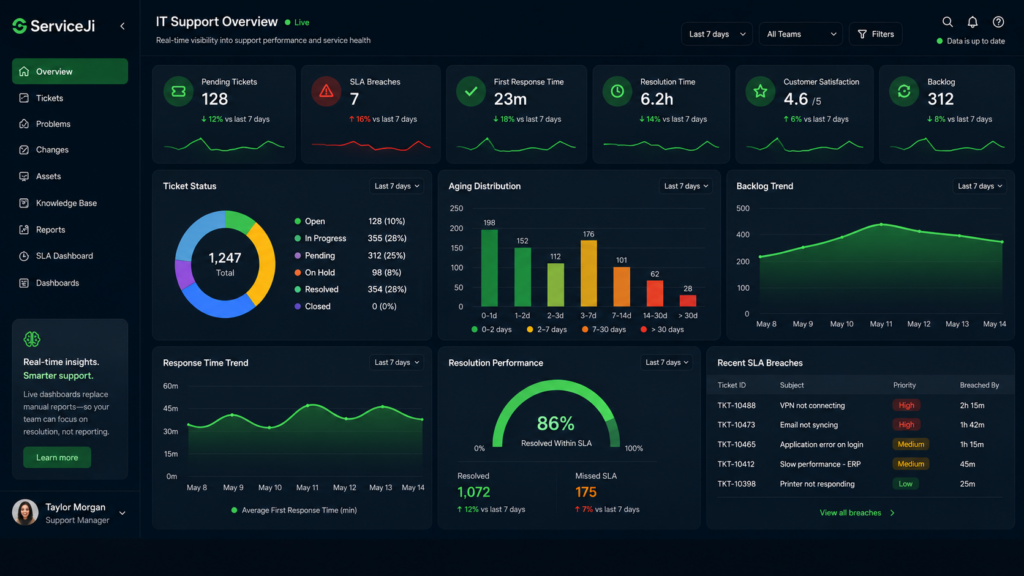
- Real-time dashboards & automation – ServiceJi IT support outsourcing provides transparent reporting of all KPIs. Instead of late Excel exports, managers see live aging histograms, backlog counts, and SLA trends. This visibility stops tickets “falling through the cracks” and ends manual chasing.
- Defined processes & ownership – As ServiceJi notes, a good outsourced service desk “owns triage and communication and applies knowledge consistently”. This means tickets are assigned correctly up-front, drastically cutting reassignments and hops. Ownership and playbooks ensure repeat issues are recognized and not reopened.
- 24×7 Expert Support – Round-the-clock coverage means tickets get immediate attention, preventing huge backlogs and SLA breaches. If Priya’s team would otherwise shut down at 5 PM, ServiceJi’s IT support engineers take over, handling nighttime incidents so nothing piles up.
- AI & Smart Routing – ServiceJi touts “advanced ticketing… AI and machine learning” to speed resolutions. AI-based assignment tools reduce human error, boosting FCR and reducing MTTR (consistent with industry cases that saw 25–30% MTTR gains from automation).
- Proactive Reporting & Alerts – Automated SLA violation warnings and performance alerts (like tickets >7 days old) keep the team ahead of problems. The research on dashboards highlights using “ticket age and hopping” metrics to pinpoint bottlenecks; ServiceJi’s platform would similarly flag these issues immediately.
- Continuous Improvement Culture – By focusing on metrics (e.g. the “repeat incidents” KPI), ServiceJi drives process refinements. Ongoing analysis (trend lines for reopen/MTTR) lets teams adjust training and tools.
In short, ServiceJi’ IT support outsourcing transforms the reactive outsourced model into a proactive, data-driven one. High reopen rates become rare because first-pass fixes are improved. SLA breaches drop due to vigilant monitoring. Backlogs shrink as tickets are resolved promptly. The manager’s day shifts from firefighting to planning: she uses dashboards to spot emerging problems instead of endlessly emailing for status. As one service management guide notes, “manually time-consuming” reporting is replaced by a BI dashboard that “significantly improves reporting efficiency, enhances SLA monitoring, and supports data-driven decision-making”.
Recommendations
Outsourcing an IT support desk frees up costs, but without the right processes it often outsources problems. As we’ve shown, key helpdesk KPIs are valuable diagnostics: they shine a light on efficiency, quality, and user experience. ServiceJi’s model centers on these metrics. The “After ServiceJi” scenario is a transformed reality seen by our clients: fewer tickets pending, more tickets resolved on first contact, virtually no SLA breaches, and managers finally see meaningful dashboards instead of spreadsheets. In practical terms, Priya ends her day confident that every critical incident is either resolved or tracked, and her SLA compliance is transparent at all times.
Assumptions and Caveats
- Enterprise Profile: We assumed a mid-sized company (hundreds of users) with a 24×7 IT support requirement. If an organization is smaller or non-24×7, some points (e.g. 24×7 coverage) would scale accordingly.
- Benchmarks Variability: KPIs like “good FCR” or “acceptable reopen rate” vary by industry; we cited typical targets (FCR ~70–80%, reopen <5%) but each IT department should tailor goals.
- Data Completeness: Where direct figures were unavailable (e.g. “ticket hopping” benchmarks), we relied on qualitative industry sources to define the problem and its remedies. Future work could refine numeric targets per industry.
By foregrounding transparency and metrics, ServiceJi’s IT support desk outsourcing solutions promise to eliminate the “black box” and give managers like Priya back control of their day.